


Pernah mengalami ini? Pesan error ini muncul di ketika kita menginstal Aplikasi dari playstore. Pesan kesalahan ini muncul sesaat kita menekan tombol “instal / pasang ” .
You cannot install this app because another user has already installed an incompatible version on this device
Sepertinya error ini hanya terjadi pada Android Lollipop. Kalau dilihat dari pesan errornya, ini berkaitan dengan fitur multi user yang ada di Android versi ini. Pesan Error ini akan muncul ketika kita pernah menginstal aplikasi ini, lalu saat melakukan Uninstall belum bersih benar dari user lainya, alhasil pesan kesalahan ini muncul saat kita mencoba menginstal aplikasi yang sama.
Nah untuk menyelesaikan masalah ini langkah yang perlu dilakukan adalah menghapus atau menguninstal aplikasi bersangkutan dari semua user. Langkah langkahnya sebagai berikut :
- Go to settings
- Go to app
- Go to downloaded app list
- You can see the uninstalled application in the list.
- Click on the application, go to more optionClick on uninstall for all users options
Sekian bro, sampai ketemu di tutorial selanjutnya.
Salam bahagia~
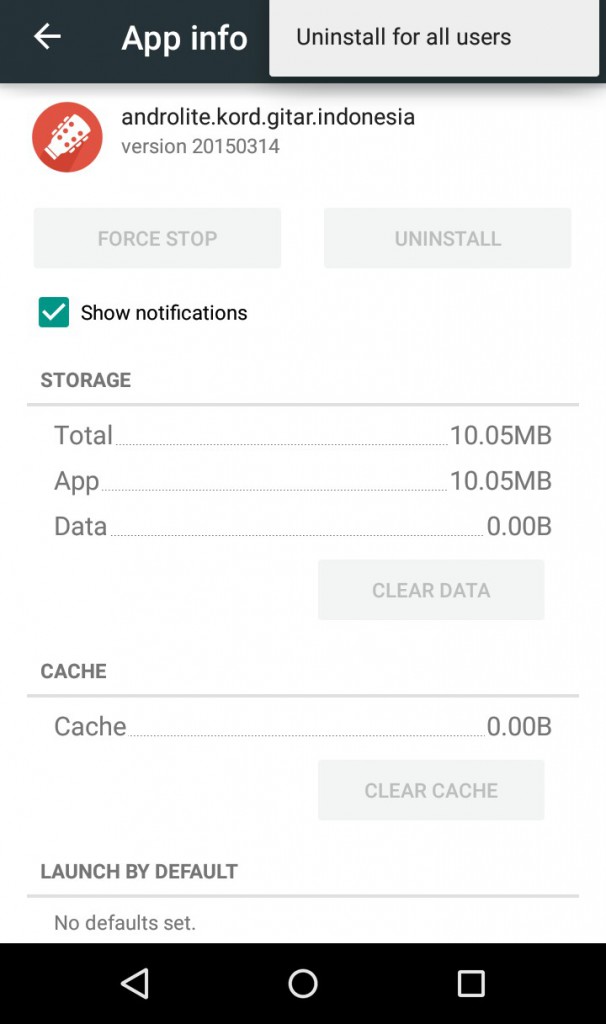


cuma pake 1 user, jadi gak pernah ngalamin :))
Hih hahahaha :p
Saran macam apa ini. Mau nyari solusi malah suruh uninstall -_-
Help Me Bro !!! I Got One Major Problem…
I’m using Samsung Galaxy S6 edge+ (Android Marshmallow Running) Non-Rooted Smartphone..In Playstore I Would Like To download Mini Militia.It Shows (another User has Already installed Incompitable version) On The device.
In My device There is no Downloadable Apps Option in Appmanager.When myself Check The Application Manager there Is No Mini Militia !!! When I clear the data & Cache Of Playstore in application Manager.
Again open The Playstore And Install Mini Militia It Shows Again like (Another user has Already installed Incompitable Version on the device)
Mini Militia Patched apk Is Successfully installed…(In that time There is no problem.)Then Open and Play the game..Again Uninstall that one & Install Original Version From playstore It Again Says another User has Alredy Installed incompitable Version..
How 2 fix the Problem Bro ?????????
Hi bro,
You can follow the step above. Go to your app manager and uninstall your Mini Militan from all user. You can find the option on the right top.
☆☆☆{{Another User Has Already Installed Incompitable version of this device}}☆☆☆
Hi Bro !!!!
Already I hv a Modded Mini Militia…(Playstore Version MM )+(Website MM Patcher) it Will join together form Non Playstore Version (Mod) Of Minimilitia..Website Gives the new update of MM patcher…..[[ I hv Already Moded Mini Militia ]] In that time I’m Download the New Patcher also..and Install the Patch..
Patch Size : 2MB Only .It may take More time to install !! when Installing….I Will be Minimised and It comes 2 homescreen)
The Patch is will not be Installed..Suddenly Restart The Phone and After The Patch is Showing In My apps…Open the Patch and fill it Myself what me want !! Then Install !!! It shows app not installed…After Me uninstalled Mini Militia & Uninstalled Patch Also.. Then Install the Playstore version Of mini militia It Shows(Another User Has Already Installed Incompitable version of this device)
Finally I’m Go 2 My App Manager !!!! In the Downloaded App List Mini Militia Willn’t be Found…
Again Go 2 Playstore and Install Means (Another User Has Already Installed Incompitable version of this device) Again It Show That..
What to do Bro ?????
Factory Reset Only Possible ???????